

Relationships
Connect your entities with UML relationships. AeroCoding generates navigation properties, foreign keys, EF Core configurations, and handles cascade behaviors automatically.
Relationship types
AeroCoding supports 7 UML relationship types. Each type affects how code is generated and how entities interact.


Association
Simple reference between independent entities. Neither entity owns the other.
Navigable Association
Association with explicit foreign key. The arrow shows the navigation direction.
Inheritance
'Is-a' relationship. Child inherits all properties and methods from parent.
Implementation
Entity implements an interface contract. Dashed line in UML.
Dependency
Weak dependency. Source uses target but doesn't store reference.
Aggregation
Weak 'has-a' relationship. Child can exist independently of parent.
Composition
Strong 'owns' relationship. Child cannot exist without parent. Cascade delete enabled.
Tip
Creating relationships
Connect entities by selecting a relationship type and drawing between cards.


Select relationship type
Click on a relationship type in the floating toolbar. The cursor changes to indicate connection mode.
Click source entity
Click on the entity that will be the source of the relationship. Connection handles appear on all sides.
Drag to target
Drag from the source to the target entity. A preview line follows your cursor showing the connection.
Configure properties
The relationship is created and selected. Use the properties panel to configure cardinality, names, and behavior.
Info
Connection properties
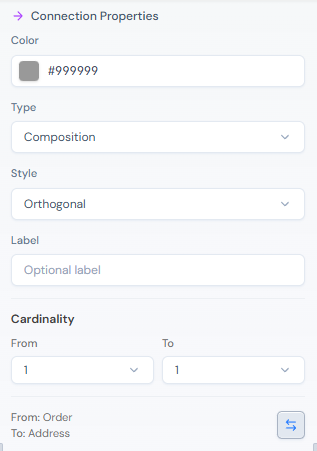
Select any relationship to configure its properties in the right sidebar.
| Property | Description |
|---|---|
| Source | The entity where the relationship starts (displays the FK for navigable associations) |
| Target | The entity where the relationship points to |
| Source Cardinality | How many source instances can participate (1, 0..1, *) |
| Target Cardinality | How many target instances can participate (1, 0..1, *) |
| Source Name | Navigation property name on source entity (e.g., "posts") |
| Target Name | Navigation property name on target entity (e.g., "author") |
| Nullable | Whether the FK can be null (optional relationship) |
Cardinality
Cardinality defines how many instances can participate on each side of the relationship.
One to One
1 ─── 1Each instance on one side relates to exactly one instance on the other.
One to Many
1 ─── *One instance relates to multiple instances. The most common relationship type.
Many to Many
* ─── *Multiple instances on both sides. Requires a join table in the database.
Optional One to Many
0..1 ─── *Like 1:N but the 'one' side is optional. FK is nullable.
Info
Unidirectional
Only one entity has a navigation property. Post has Author, but User doesn't have Posts. Simpler model, less coupling.
Bidirectional
Both entities can navigate to each other. User.Posts and Post.Author. More flexible but requires careful handling of circular references.
No navigation
Neither entity has a navigation property. Only the FK exists. Useful for loose coupling between bounded contexts.
Tip
Delete behavior
Configure what happens to related entities when the parent is deleted.
| Behavior | Description | Use Case |
|---|---|---|
| Cascade | Delete all related entities when parent is deleted | Order → OrderItems (items belong to order) |
| Restrict | Prevent deletion if related entities exist | Category → Products (can't delete used category) |
| SetNull | Set FK to null when parent is deleted (requires nullable FK) | Post → Author (keep post, remove author) |
| NoAction | Database takes no action, application must handle | Custom business logic required |
Warning
Generated code
See how relationships translate to production code across your architecture layers.
public sealed class User : AggregateRoot{ public string Name { get; private set; } public string Email { get; private set; } // Navigation property (one-to-many) private readonly List<Post> _posts = new(); public IReadOnlyCollection<Post> Posts => _posts.AsReadOnly(); public Result<Post> AddPost(string title, string content) { var post = Post.Create(title, content, this); if (post.IsFailure) return post; _posts.Add(post.Value); return post; }}public sealed class Post : Entity{ public string Title { get; private set; } public string Content { get; private set; } // Foreign key public Guid AuthorId { get; private set; } // Navigation property (back-reference) public User Author { get; private set; } internal static Result<Post> Create(string title, string content, User author) { // Validation... return Result.Ok(new Post { Title = title, Content = content, Author = author, AuthorId = author.Id }); }}public class PostConfiguration : IEntityTypeConfiguration<Post>{ public void Configure(EntityTypeBuilder<Post> builder) { builder.ToTable("posts"); builder.HasKey(e => e.Id); builder.Property(e => e.Title) .IsRequired() .HasMaxLength(200); builder.Property(e => e.Content) .IsRequired(); // Relationship configuration builder.HasOne(p => p.Author) .WithMany(u => u.Posts) .HasForeignKey(p => p.AuthorId) .OnDelete(DeleteBehavior.Cascade); }}Next steps
Continue exploring the editor capabilities.